
Live wallpaper for Mac
A live aquarium wallpaper for your Mac
Fish swim behind your desktop icons, notice your cursor and race for the food you drop. It's an animated 3D fish tank drawn as you watch, not a video on repeat.
Coming soon to the Mac App Store
To open this page on your Mac, copy its address:
- Free, with Shoal Pro free for 7 days and a one-time upgrade
- macOS 14 Sonoma or later, Apple silicon and Intel
- No account, no tracking
An aquarium that lives on your desktop
Shoal draws a planted freshwater tank behind your icons and windows, on every display, and keeps out of your way while you work.
Alive, not a loop
Every fish swims on its own. Move your cursor near the school and the fish give it room; sweep it at them and they dart away. Choose Feed from the menu bar and they race for the pellets.
Easy on your Mac
Up to 60 frames a second, 30 on battery and 20 when windows cover most of the desktop. It stops when the desktop is covered, the screen is locked or asleep, or Low Power Mode is on. How Shoal saves battery
Private by design
No account, no analytics, no tracking. The aquarium works offline, and your settings and fish stay on your Mac.
Every display
The aquarium fills the desktop of each connected display, and a pinch of food drops into every running tank.
Lives in the menu bar
A small fish icon holds Feed, Show Desktop, Pause, the still images, Share Your Tank and Settings. Its first line always says what the water is doing: where it swims, or why it's still. The first time you open Shoal, a short Welcome shows you the tank and points to the fish.
A picture for later
Set a still as your desktop picture so the view stays when Shoal is closed, or save a still wherever you like.
A tank that grows with you
Name three fish, spot the visitors that come by and watch the tank fill in as the days you feed it add up. All of this is in the free aquarium.
Say hello
Name any three fish, then rest your pointer on one to see its name, even on still water. Come back to the desktop after a while and a few fish swim up to the glass to say hello.
Visitors now and then
Every so often a visitor stops by for a few minutes: three cherry shrimp, a golden mystery snail, a betta or, around Lunar New Year, a koi. The menu says when one is in the tank, and the Fish tab keeps a log of your sightings.
A tank that matures
Every day you feed the fish counts, in a row or not. A snail moves in at 7 days fed, moss grows in over the wood and stones at 30, and stem plants and ferns make the tank lush at 100.
Through the seasons
Three pumpkins sit on the sand from 17 to 31 October, and snow drifts through the water in December. Seasonal decorations can be switched off in Settings › Scene.
Share your tank
Make a picture or an 8-second clip of your aquarium, with a link that recreates your tank live on this site. You choose whether the names go with it.
A widget
The latest picture of your tank on your desktop or in Notification Center, with its days fed or, with Living Tank on, how many fish are hungry. The medium size adds any visitor and the next milestone. Click it to open the Fish tab.
Try the aquarium in your browser
A live preview of the free Riverscape scene. Move your pointer near the fish, click the water or press Feed to drop food. In the app it runs behind your desktop icons, where your Mac's battery and window rules apply; a browser tab doesn't follow them.

Shoal Pro: make the tank your own
One purchase unlocks every Pro feature below, on every Mac signed into your Apple Account.

Six species, up to 48 fish
Mix any of six species (Bloodfin Tetra, Neon Tetra, Rummy-Nose Tetra, Harlequin Rasbora, Zebra Danio and Tiger Barb), each with its own shape and pattern and shoaling with its own kind, in a school of up to 48 fish.

Light that follows your day
Choose dawn, day, dusk or night, or let Follow the Clock change the light with your local time. Changes fade in over two seconds.
A tank that remembers
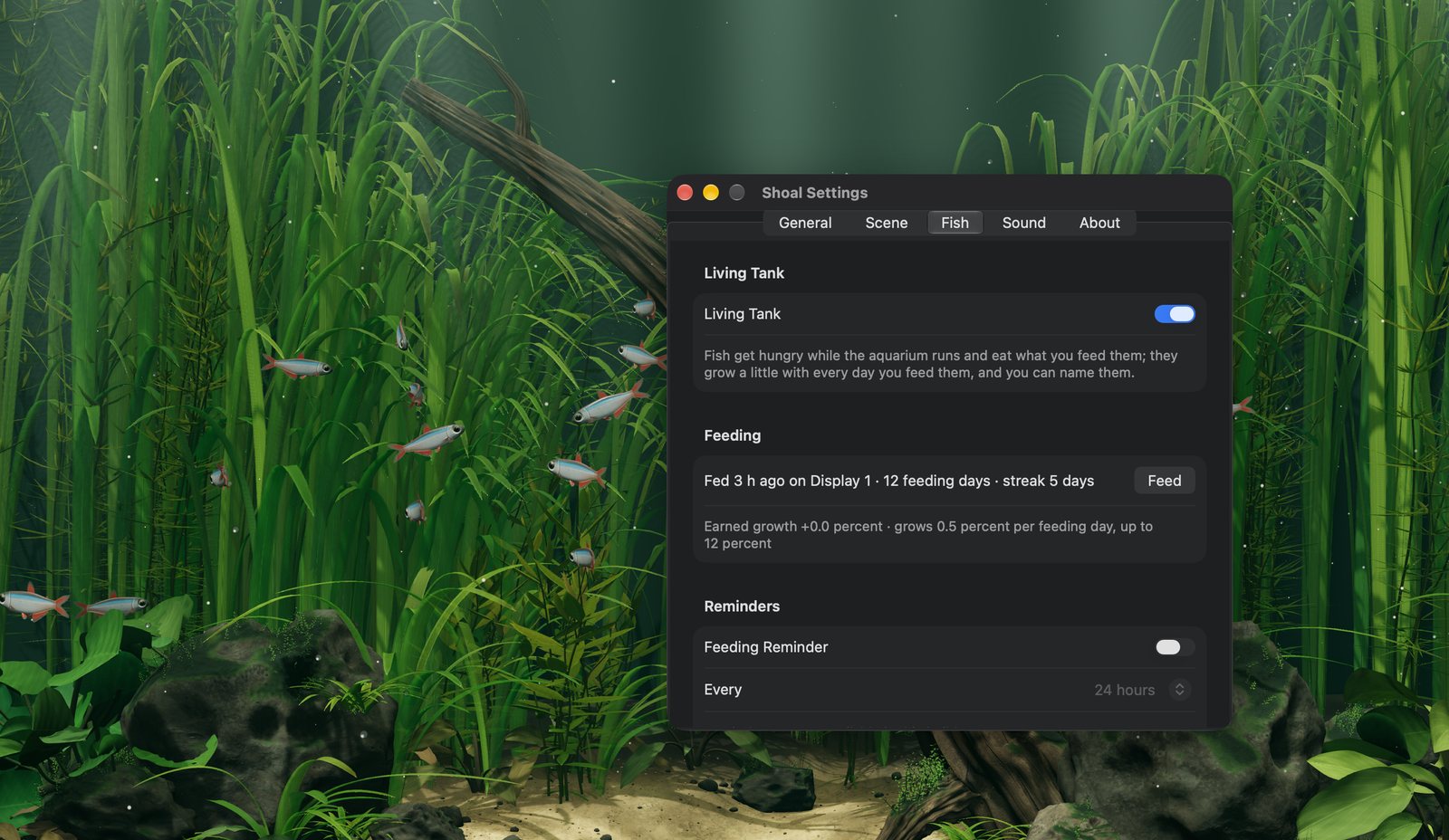
Turn on Living Tank and the fish get hungry while the aquarium runs and grow a little on each day you feed them. Fish never die. Optional reminders tell you when the tank is ready for food.
See the Fish tab full sizeThe sound of water
A gentle, generated water loop that plays only while the aquarium runs, with its own volume.
Sharper water
High graphics quality, with sunbeams that reach the riverbed when plugged in, a moving web of light on the sand and stones, more detailed stone and leaves and fuller planting by default.
A betta to keep, and every fish named
Once you've spotted a betta visiting, keep one swimming in your tank. Name every fish, not just three.
Fine-tuning
A 30-frames-a-second limit for when you'd rather your Mac stayed cool, and plant density from 30 to 100 percent.
| Feature | Free | Shoal Pro US$9.99 one-time |
|---|---|---|
| The Riverscape aquarium on every display | Included | Included |
| Fish that react to your cursor, feeding and pausing from the menu | Included | Included |
| Visitors, a tank that matures, seasons, sharing and the widget | Included | Included |
| Still images and desktop pictures | Included | Included |
| Fish species | Bloodfin tetras | Any mix of six |
| Lighting | Day | Dawn, day, dusk, night or Follow the Clock |
| Living Tank: hunger, growth, feeding streaks and reminders | —Not included | Included |
| Ambient water sound | —Not included | Included |
| Fish | 24 | Up to 48 |
| Graphics quality | Low or Balanced | Low, Balanced or High |
| Keep a betta once you've spotted one visiting | —Not included | Included |
| Fish names | Any three | Every fish |
| Frame-rate limit | —Not included | 30 frames a second |
| Plant density | —Not included | 30 to 100 percent |
Launch price: US$6.99 for the first two weeks after release, then US$9.99. One-time purchase, no subscription. Prices vary by country.
Try Shoal Pro free for 7 days from the fish menu, once per Apple Account. Nothing is charged automatically; when the trial ends, Pro switches off until you buy it, and your fish and settings stay on your Mac.
Questions
Does a live wallpaper drain my MacBook's battery?
Shoal is built to go easy on it. On battery, Balanced and High draw at most 30 frames a second instead of 60 and leave out the light shafts; Low, made for older Macs, keeps aiming for 30 without them. It slows to 20 when windows cover most of the desktop, and stops when the desktop is almost fully covered, the screen is locked or asleep, or Low Power Mode is on. How Shoal handles battery life
Will it slow down my Mac?
The aquarium runs on your graphics processor and rests whenever you can't see it. More displays and higher resolutions ask more of your Mac. The free Low quality, made for older Macs, draws the least: it aims for 30 frames a second with a softer picture, and Macs with Intel graphics start on it until you choose another quality. Balanced, also free, draws more, and Shoal Pro's High the most; Shoal Pro also adds a 30-frames-a-second limit and a plant-density control.
What happens behind my windows and full-screen apps?
The aquarium rests. It slows to 20 frames a second when less than 40 percent of the desktop shows and stops below 15 percent, which includes full-screen apps. Show the desktop again and the fish swim on. Show Desktop in the fish menu hides the apps in front of the tank until you choose Show Windows; Feed, a clip and a visitor's line in the menu hide them only while you look, and switching to one of your apps brings them back.
Does it work with more than one display?
Yes. Shoal fills the desktop of every connected display, and a pinch of food drops into every running tank.
Is Shoal a screensaver?
No. A screensaver takes over the screen when you step away. Shoal is a live wallpaper: the aquarium stays behind your icons and windows while you work, and rests when you can't see it.
What does Shoal collect?
Nothing. There's no account, no analytics and no tracking. The aquarium works offline, and your settings and fish stay on your Mac. Read the privacy policy
What do I need?
A Mac with macOS 14 Sonoma or later, with Apple silicon or an Intel processor. The free aquarium needs no account and no internet connection.
Is Shoal Pro a subscription?
No. Shoal Pro is a one-time in-app purchase with nothing to renew, and it unlocks on every Mac signed into your Apple Account. Restore Purchases brings it back on another Mac.
Can I try Shoal Pro first?
Yes. Choose Try Shoal Pro Free for 7 Days… from the fish menu and click Start Free Trial: everything in Shoal Pro for 7 days, once per Apple Account, with nothing charged automatically. Your tank gets six species, 36 fish, lighting that follows the clock and the living tank at once, with an Undo. When the trial ends, Pro switches off until you buy it; your fish, their names and your settings stay on your Mac. You can also preview the dawn, dusk and night lighting, Follow the Clock and the water sound for up to five minutes while the Shoal Pro window is open.
Bring your desktop to life
A calm, living aquarium behind your work. Free to start, with Shoal Pro when you want more.
Coming soon to the Mac App Store